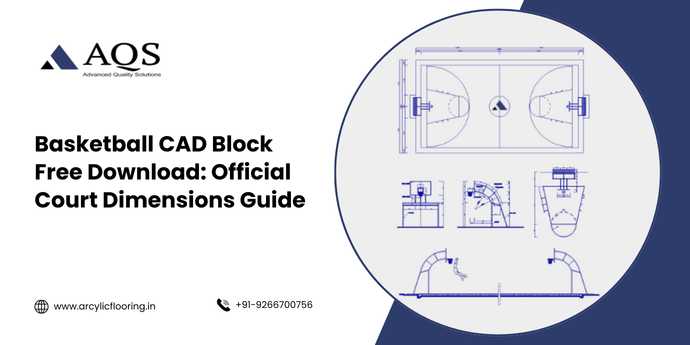
Basketball court designers, architects, and sports facility managers rely heavily on basketball CAD blocks to streamline their planning and design processes. A basketball CAD block represents a pre-made, dimensionally accurate digital representation of basketball court layouts that professionals import into their Computer-Aided Design (CAD) software. These blocks save designers countless hours and ensure precise court dimensions for both professional and recreational basketball facilities.
Table of contents
- What Is a Basketball CAD Block?
- Understanding Basketball Court Dimensions: The Foundation for CAD Blocks
- Applications and Industries Using Basketball CAD Blocks
- Creating and Customizing Basketball CAD Blocks
- Tools and Software for Basketball CAD Block Implementation
- Best Practices for Basketball CAD Block Implementation
- Common Challenges and Solutions in Basketball CAD Block Usage
- The Future of Basketball CAD Blocks and Digital Design
- Basketball CAD Blocks (Q&A)
- Conclusion: Maximizing Basketball CAD Block Benefits in Your Projects
What Is a Basketball CAD Block?
A basketball CAD block functions as a reusable digital component in CAD applications like AutoCAD, LibreCAD, or similar design platforms. Designers utilize these pre-configured blocks to represent complete basketball courts with accurate measurements, court markings, and dimensional specifications. The basketball CAD block includes all essential court elements such as the baseline, three-point line, free-throw circle, half-court line, and hoop placement. Professionals insert these blocks into architectural drawings, facility plans, and construction documents without manually redrawing every single court element. The basketball CAD block dramatically reduces design time while maintaining industry-standard measurements and compliance with official basketball regulations established by organizations like the NBA, NCAA, and FIBA.
Understanding Basketball Court Dimensions: The Foundation for CAD Blocks
Official Court Measurements and Standards
Basketball courts maintain standardized dimensions across professional, collegiate, and recreational levels, though minor variations exist depending on the governing organization. The NBA court measures 94 feet in length and 50 feet in width, providing ample space for professional play. NCAA courts match these NBA dimensions exactly, ensuring consistency at the collegiate level. International play under FIBA regulations specifies courts measuring between 85-91.86 feet in length and 49.21-52.49 feet in width, offering slightly more flexibility. High school basketball courts measure 84 feet long and 50 feet wide, fitting standard gymnasium dimensions across America. Recreational and youth basketball courts vary considerably, ranging from 74-84 feet in length depending on facility constraints and age group requirements. These measurements form the backbone of any basketball CAD block.
| Basketball Court Type | Length | Width | Three-Point Line Distance | Free-Throw Line Distance |
| NBA/NCAA | 94 feet | 50 feet | 23.75 feet | 15 feet |
| FIBA International | 85-91.86 feet | 49.21-52.49 feet | 22.15 feet | 12.25 feet |
| High School | 84 feet | 50 feet | 19.75 feet | 15 feet |
| Youth/Recreational | 74-84 feet | 40-50 feet | Variable | 12-15 feet |
Also Read: Basketball Court Dimensions in Meters Guide
Upgrade Your Sports Court Today
Get premium synthetic acrylic flooring designed for durability, grip, and performance.
Get Free ConsultationKey Measurements Within Basketball CAD Blocks
The hoop sits exactly 10 feet above the court surface on all basketball courts worldwide-this measurement remains constant regardless of league or competition level. The free-throw line extends 15 feet from the baseline on NBA and high school courts, creating the free-throw zone where players attempt uncontested shots. The three-point line curves outward from the hoop, measuring 23.75 feet from the center of the basket on NBA courts, 22.15 feet under FIBA regulations, and 19.75 feet on high school courts. The restricted area box extends 4 feet from the baseline on each side of the basket, designating the zone where defensive players face technical foul consequences for camping under the basket. The half-court line divides the playing surface equally, measuring 47 feet from each baseline. Professional basketball CAD blocks must incorporate these precise measurements to satisfy architect and facility manager requirements.
Calculate Your Sports Court Dimensions!
Contact us for Quickly measure and calculate accurate sports court dimensions with this easy-to-use tool!
Why Basketball Professionals Need CAD Blocks
Time Efficiency and Project Acceleration
Basketball CAD blocks eliminate repetitive drawing tasks that traditionally consumed hours of designer time. Rather than manually constructing court layouts from scratch, professionals drag preexisting blocks into their CAD drawings and instantly visualize complete court configurations. This efficiency advantage proves invaluable when designers manage multiple facility projects simultaneously, each requiring accurate basketball court representations. The basketball CAD block approach enables architects to focus on unique facility aspects-seating arrangements, facility circulation, building envelope integration-rather than redrawing standardized court elements. Designers complete projects faster while maintaining absolute dimensional accuracy throughout their architectural documentation.
Consistency and Accuracy Assurance
Standardized basketball CAD blocks guarantee that every court representation maintains identical, verified measurements meeting official specifications. Manually drawn courts introduce human error-slightly misplaced lines, incorrect curve radii, or inconsistent dimensions compromise project accuracy. The basketball CAD block prevents these costly mistakes by providing pre-verified dimensions that designers trust completely. Contractors reference these accurate CAD blocks during construction, ensuring the finished facility meets playing surface specifications exactly. Sports facility operators benefit because courts built from CAD block specifications accommodate regulation basketball equipment and gameplay without modifications.
Professional Documentation Standards
Architects, engineers, and facility managers working on basketball court projects maintain professional credibility by using properly dimensioned basketball CAD blocks in their formal documentation. Consultants demonstrate expertise and attention to detail when they incorporate accurate, professionally-created CAD blocks into their drawings. Building permits, construction documents, and facility specifications require precise court measurements-basketball CAD blocks satisfy these regulatory requirements seamlessly. Courts designed with verified CAD blocks pass municipal inspections without dimensional corrections or redesign requests.
Basketball CAD Block Components and Features
Essential Court Elements Included in CAD Blocks
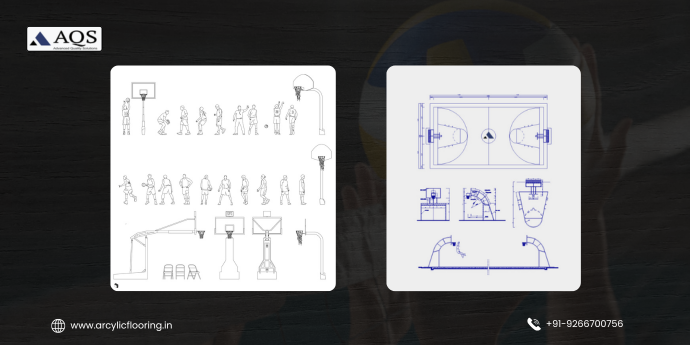
Professional basketball CAD blocks contain all visible court markings and dimensional references necessary for complete facility planning. The perimeter baseline encompasses the full court width, defining where out-of-bounds play begins. The sidelines run the entire court length, establishing side boundaries and out-of-bounds territories. The center jump circle occupies the half-court area where opening and certain jump ball situations occur-this circle measures 6 feet in diameter on NBA courts and 4 feet on NCAA courts. The free-throw circle surrounds the free-throw lane, measuring 12 feet in diameter with the neutral circle area in the center. Corner three-point lines create the distinctive curved geometry that basketball courts display, with variations depending on court type and league specifications. Hoop placement markers indicate the exact center of the backboard and basket, positioned 1 foot 9 inches from the baseline centerline on NBA and NCAA courts.
| CAD Block Component | NBA Specification | NCAA Specification | High School Specification |
| Court Length | 94 feet | 94 feet | 84 feet |
| Court Width | 50 feet | 50 feet | 50 feet |
| Three-Point Line Arc | 23.75 feet radius | 23.75 feet radius | 19.75 feet radius |
| Free-Throw Lane Width | 12 feet | 12 feet | 12 feet |
| Center Circle Diameter | 12 feet | 12 feet | 12 feet |
| Restricted Area Depth | 4 feet | 4 feet | 4 feet |
| Lane Line Width | 2 inches | 2 inches | 2 inches |
Digital Properties and Technical Specifications
Basketball CAD blocks exist as digital objects within CAD software environments, featuring precisely defined layers, line weights, and drawing properties. Designers scale blocks proportionally without compromising dimensional accuracy, adapting court representations to different drawing scale requirements-whether architects display courts at 1/16 inch equals 1 foot or 1/8 inch equals 1 foot. Layer organization within basketball CAD blocks separates court elements logically: baseline layers, three-point line layers, free-throw zone layers, and dimension reference layers. Line weights vary to distinguish between primary court markings and secondary reference lines, enhancing drawing clarity and professional appearance. Color coding within CAD blocks-using white lines on dark backgrounds or dark lines on light backgrounds-matches standard basketball court paint schemes and printing conventions.
Applications and Industries Using Basketball CAD Blocks
Architectural and Sports Facility Design
Architects designing new gymnasium complexes, recreation centers, and multi-purpose sports facilities incorporate basketball CAD blocks into comprehensive building documentation. The basketball CAD block provides the precise court footprint necessary for calculating surrounding space requirements, determining building dimensions, and planning facility circulation patterns. Designers utilizing accurate CAD blocks ensure that courts fit properly within existing buildings or new construction, preventing costly on-site modifications or facility undersizing. Master planning projects for university campuses, municipal recreation departments, and private sports clubs rely on basketball CAD blocks to visualize complete facility layouts and coordinate with other building systems.
Construction and Facility Installation
General contractors and specialized sports surfacing companies utilize basketball CAD block specifications to guide court installation processes. The CAD block provides the exact layout contractors mark during construction, serving as a reference for line placement, hoop positioning, and surface finishing. Facility managers use CAD block drawings during contractor bidding processes, ensuring all bids reference identical specifications and prevent cost discrepancies. Change orders during construction decrease substantially when contractors work from verified basketball CAD blocks, reducing disputes about court dimensions or marking placement.
Educational and Training Institutions
Educational institutions from elementary schools to universities incorporate basketball CAD blocks into facility planning documents for new gymnasiums and renovation projects. Physical education directors utilize these blocks to assess court space within existing buildings, determining if standard court dimensions fit within facility constraints. Athletic directors reviewing expansion plans reference basketball CAD blocks to understand how courts impact overall facility layouts and neighboring spaces. Coaching staff benefit from accurate court representations that reflect actual playing surface dimensions, enabling realistic training environment design.
Creating and Customizing Basketball CAD Blocks
Design Process and Technical Development
Creating a professional basketball CAD block begins with establishing baseline dimensions according to the specific court type-NBA, NCAA, high school, or recreational specifications. Designers then construct individual elements: baselines, sidelines, three-point arcs, free-throw circles, and restricted areas using precise measurement inputs and geometric construction tools within CAD software. The basketball CAD block development process ensures all curves follow mathematically precise arc calculations rather than freehand drawing, guaranteeing accuracy that manual construction cannot achieve. Designers verify completed blocks against official specifications from governing organizations, cross-referencing dimensions before releasing the basketball CAD block for professional use.
Customization Options for Specific Needs
Standard basketball CAD blocks provide fundamental court layouts, but professionals often customize blocks for specific facility requirements. Designers modify block elements to accommodate facility constraints-narrower courts, shorter baselines, or adjusted three-point distances for youth facilities. Customization includes adding court numbers, facility identifiers, or directional references within the basketball CAD block. Some professionals expand CAD blocks to include surrounding spaces: bleacher sections, equipment storage areas, or accessibility features. The basketball CAD block customization process maintains dimensional accuracy while adapting to unique facility requirements.
Tools and Software for Basketball CAD Block Implementation
Popular CAD Software Platforms
AutoCAD remains the industry-standard software for professional basketball CAD block creation and implementation, offering extensive tools for precise geometric drawing and block management. LibreCAD provides open-source alternatives for designers seeking cost-effective CAD solutions without sacrificing basketball CAD block functionality. DraftSight delivers professional-grade CAD capabilities with strong block management features and compatibility with AutoCAD file formats. SketchUp integrates basketball CAD blocks into three-dimensional facility visualizations, enabling stakeholders to understand court placement within complete building environments. Revit, a Building Information Modeling (BIM) platform, incorporates basketball CAD blocks as intelligent facility components that link court specifications with material, cost, and scheduling data.
Software Comparison and Capabilities
| Software Platform | Basketball CAD Block Support | Cost Structure | Learning Curve | Professional Use |
| AutoCAD | Full featured block library | Subscription | Moderate | Industry standard |
| LibreCAD | Good customization support | Free/Open-source | Moderate | Growing adoption |
| DraftSight | Complete block functionality | One-time purchase | Moderate | Professional firms |
| SketchUp | 3D visualization focused | Free/Paid versions | Low | Visualization projects |
| Revit BIM | Parametric intelligent blocks | Subscription | Steep | Large institutional projects |
Upgrade Your Sports Court Today
Get premium synthetic acrylic flooring designed for durability, grip, and performance.
Get Free ConsultationBest Practices for Basketball CAD Block Implementation
Standardization and Documentation
Professional organizations utilizing basketball CAD blocks establish documentation standards ensuring consistent usage across all projects. Creating a library of approved basketball CAD block templates-with standard layer organization, naming conventions, and line weight specifications-provides all team members with identical starting resources. Documentation practices within basketball CAD block implementation include maintaining version controls, tracking revision history, and ensuring all team members access the most current block versions. Standardization prevents inconsistencies across multiple projects and ensures seamless coordination when multiple team members work simultaneously.
Quality Verification and Testing
Basketball CAD blocks require thorough verification before professional deployment. Designers test blocks by inserting them into sample drawings, confirming dimension accuracy and visual appearance match expectations. Verification processes include comparing CAD block measurements against official court specifications from NBA, NCAA, FIBA, or relevant governing bodies. Quality control procedures document any discrepancies and require corrective action before basketball CAD block release. Testing in actual project scenarios-inserting blocks into facility plans at various scales-confirms that blocks function correctly across different drawing requirements.
Integration with Broader Design Workflows
Effective basketball CAD block implementation integrates seamlessly with broader architectural and engineering workflows. Designers organize blocks logically within CAD libraries, enabling quick location and insertion during project development. The basketball CAD block integration includes establishing clear naming conventions-such as “Court_NBA_94x50” or “Court_HS_84x50”-that immediately communicate block content and specifications. Workflow integration ensures basketball CAD blocks coordinate properly with surrounding facility elements, maintaining consistent scales and maintaining proper layer relationships with other architectural components.
Advantages of Using Pre-Made Basketball CAD Blocks
Reduced Design Costs and Timeline
Utilizing pre-made basketball CAD blocks eliminates expensive custom drawing work, reducing project costs substantially. Design teams complete projects faster when blocks accelerate preliminary design phases, enabling architects to move quickly into detailed development and client presentation stages. The cost savings from basketball CAD block utilization typically exceed purchase costs within single project applications. Facilities with long-term planning horizons achieve cumulative savings by reusing the same basketball CAD blocks across multiple projects spanning years or decades.
Professional Appearance and Client Communication
Well-designed basketball CAD blocks create professional drawing presentations that enhance client confidence and communication. Visual clarity in facility plans-derived from accurate, properly formatted basketball CAD blocks-helps non-technical stakeholders understand proposed court locations and configurations. The professional appearance of basketball CAD block-based drawings satisfies municipal review board requirements and building permit applications without revisions. Contractors and construction crews working from basketball CAD block specifications complete installations with minimal confusion or rework.
Common Challenges and Solutions in Basketball CAD Block Usage
Scalability and Drawing Integration Issues
Basketball CAD blocks sometimes display improperly when inserted at unusual drawing scales or within complex facility plans containing multiple drawing elements. Solution: Establish standardized drawing scales within projects and configure basketball CAD blocks with scale-dependent visibility controls-automatically showing or hiding elements based on zoom level. Designers overcome integration challenges by organizing project drawings with consistent scale standards from inception, preventing mid-project scale conversions that disrupt basketball CAD block appearance.
Accuracy and Specification Compliance Problems
Outdated basketball CAD blocks containing measurements from superseded court specifications create compliance issues when facility codes update. Solution: Maintain current library versions reflecting latest court specification standards, implementing annual review cycles that verify block accuracy. Document block specifications clearly, including applicable court type, league standards, and revision dates, ensuring users select appropriate blocks matching current project requirements.
Software Compatibility and File Format Concerns
Basketball CAD blocks created in specific software formats may experience compatibility issues when team members use different CAD platforms. Solution: Establish standardized file formats-such as DWG or STEP formats-that most professional CAD software supports. Create multiple format versions of basketball CAD blocks when teams utilize diverse software platforms, ensuring everyone accesses properly formatted files for their software environment.
The Future of Basketball CAD Blocks and Digital Design
Technological Advancement and Innovation
Emerging technologies promise enhanced basketball CAD block capabilities and integration possibilities. Three-dimensional parametric blocks enable dynamic court geometry adjustments, automatically recalculating dependent measurements when designers modify baseline dimensions. Cloud-based CAD collaboration tools facilitate real-time basketball CAD block sharing among distributed design teams, improving project coordination across remote offices and international locations. Artificial intelligence tools assist basketball CAD block design by automatically converting facility sketches into accurate digital blocks, accelerating the block creation process while maintaining dimensional precision.
Calculate Your Sports Court Dimensions!
Contact us for Quickly measure and calculate accurate sports court dimensions with this easy-to-use tool!
Integration with Facility Management Systems
Advanced facility management platforms increasingly incorporate basketball CAD blocks as foundational data elements linking design specifications with operational requirements. Basketball CAD blocks serve as references for maintenance planning, equipment ordering, and facility utilization scheduling. Integrated systems enable facility managers to query CAD block data for information-court dimensions, material specifications, equipment locations-streamlining day-to-day operations. This integration trend suggests basketball CAD blocks will evolve beyond static design tools into dynamic facility management components.
Basketball CAD Blocks (Q&A)
A: NBA basketball CAD blocks represent courts measuring exactly 94 feet in length and 50 feet in width, matching official NBA playing surface specifications.
A: Yes, basketball CAD blocks can be modified by adjusting baseline dimensions, three-point line distances, and lane widths to accommodate specific facility constraints while maintaining court playability.
A: AutoCAD provides the most comprehensive basketball CAD block support with extensive professional libraries, though LibreCAD, DraftSight, and Revit offer robust alternatives depending on specific project requirements.
A: Basketball CAD blocks maintain accuracy through proper scale setup within CAD software establish uniform drawing scales across projects and configure block scale-dependent properties to display consistently.
A: Yes, basketball CAD blocks export to 3D formats enabling integration within SketchUp, Revit, and other visualization platforms for comprehensive facility rendering and stakeholder presentations.
Conclusion: Maximizing Basketball CAD Block Benefits in Your Projects
Basketball CAD blocks represent essential digital tools transforming how facility designers, architects, and construction professionals approach court planning and implementation. These standardized, dimensionally accurate digital components eliminate manual drawing work while guaranteeing compliance with official court specifications. Whether designing professional NBA facilities, collegiate athletic complexes, high school gymnasiums, or recreational recreation centers, basketball CAD blocks accelerate project timelines and enhance design accuracy substantially.
Professional adoption of basketball CAD blocks continues growing as design teams recognize compelling benefits: reduced project costs, accelerated timelines, improved quality control, and enhanced professional presentation capabilities. Modern CAD software platforms provide increasingly sophisticated basketball CAD block libraries, enabling designers to access verified, professionally-created blocks matching virtually every court specification requirement.
As technology evolves, basketball CAD blocks will integrate more deeply with facility management systems, parametric design tools, and collaborative digital platforms. Designers embracing basketball CAD block technology position themselves at the forefront of sports facility design innovation, delivering superior results while maintaining competitive advantage through enhanced efficiency and professional credibility. Whether you’re commencing your first basketball facility design project or managing comprehensive facility renovation initiatives, basketball CAD blocks provide the foundation for success.